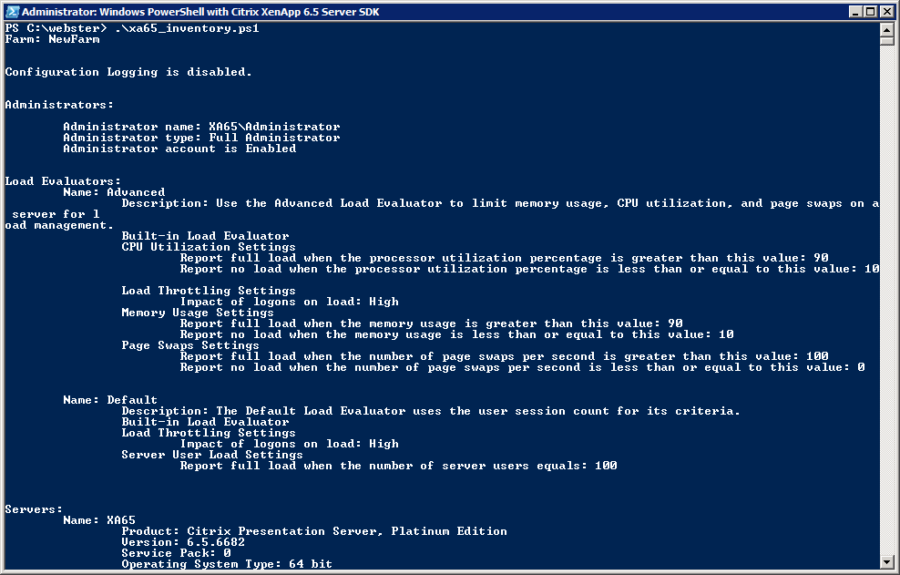
I received an email from a reader wanting to get my Citrix XenApp 6.5 Farm PowerShell documentation script to work remotely. After I wrote my original script and article, Citrix updated the XenApp 6.5 PowerShell SDK to support Remoting and a Default Computer Name. Even using the new –ComputerName parameter, he was still unable to get my script to work.
Note: This article was updated on November 20, 2015. Go to the bottom of this article to see the updated information.
I installed the Citrix XenApp 6.5 PowerShell SDK and Group Policy modules on my lab domain controller. All my lab servers have the Windows Firewall enabled and Server Manager Remote Management enabled.
I found this information in the SDK help file on Remoting Cmdlets:
This section explains how to invoke the XenApp Commands remotely. In XenApp 6.5 the cmdlets can be remoted using
the -ComputerName parameter.  In order to facilitate running existing scripts remotely without having to make
significant changes, a default computer name can be set in the client machine. To do this a new set of cmdlets
was introduced. When the default computer name is set, all the cmdlets will automatically remote to the server
specified without having to explicitly use the -ComputerName parameter every time.

To set the default computer name:

Set-XADefaultComputerName server1
My lab XenApp 6.5 server is named XA65, so I entered on my domain controller.
Set-XADefaultComputerName XA65
When I ran my documentation script, I received:

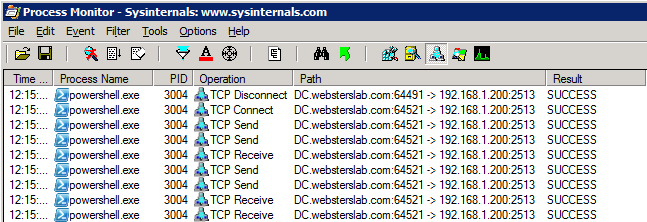
I then ran Microsoft’s Sysinternals ProcMon to get a network trace. I found that TCP Port 2513 needed to be opened (Figure 2).
My wife tells me I couldn’t find a 10 gallon (37.8541 Liter) jug of milk on the fridge’s top shelf! What does this have to do with anything? DOH! At the top of the help file, I now see (Figure 3):

The help text says TCP Port 2513 must be opened on both computers, but I found I only needed it opened on the XenApp server. To me, that is one less port open on my network.
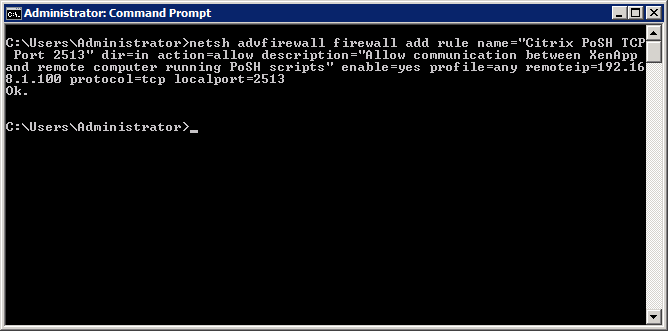
I created a Windows Firewall Rule on my XenApp server to open TCP Port 2513 between the domain controller and my XenApp server (Figure 4). The “remoteip” will need to be the computer’s IP address used to run the script.
netsh advfirewall firewall add rule name="Citrix PoSH TCP Port 2513" dir=in action=allow description="Allow communication between XenApp and remote computer running PoSH scripts" enable=yes profile=any remoteip=192.168.1.100 protocol=tcp localport=2513
The Windows Firewall GUI shows my new rule created and enabled (Figure 5).

Now my script runs (Figure 6).
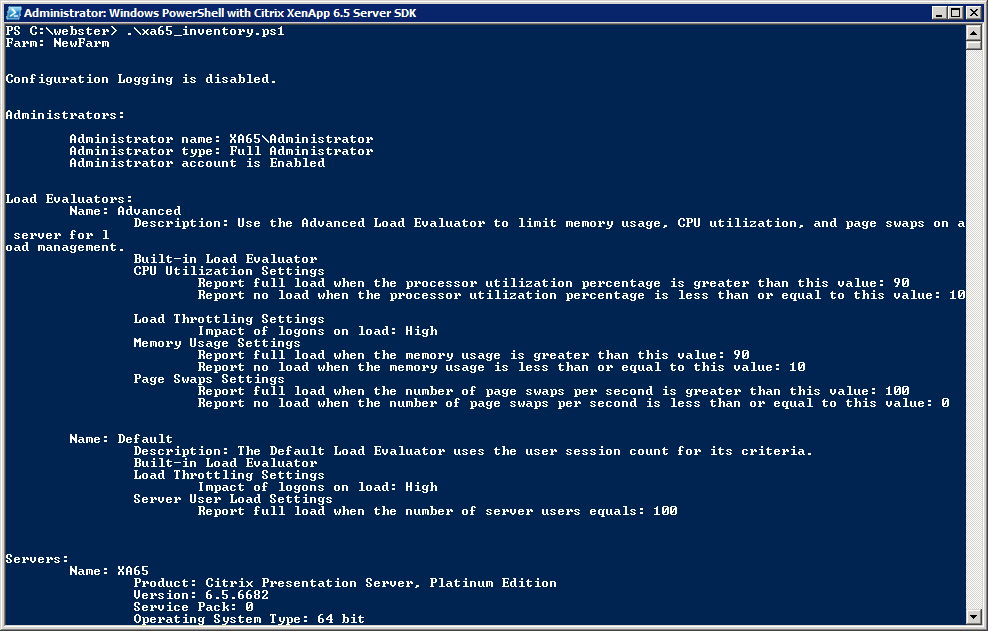
Now you can use my XenApp 6.5 PowerShell Documentation Script with absolutely no modifications and have it work with remoting. Thanks, Citrix, for making this so easy.
Update November 20, 2015:
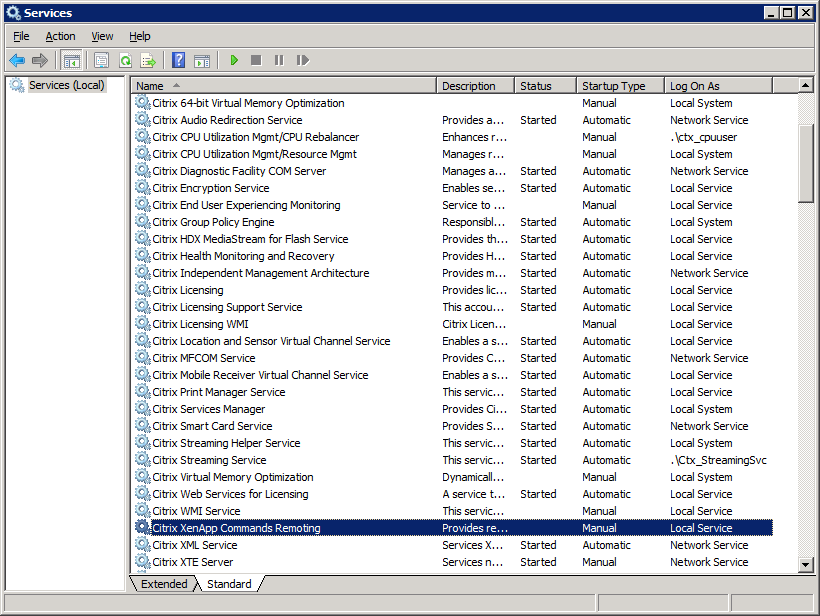
If you are having an issue connecting, make sure the Citrix XenApp Commands Remoting service is started. I have seen this service in three states at various locations: Manual, Automatic but not Started, and Automatic and Started. Make sure this service is Started, and then your remote connection should succeed.
Thanks to my Aussie friend Jeremy Saunders for reminding me to update this article with this information.
we are using App-v for office products on the citrix servers and when I run the script i’m getting this message back.
WARNING: The Word object could not be created. You may need to repair your Word installation.
SetupWord :
The Word object could not be created. You may need to repair your Word installation.
Script cannot continue.
At C:\PS_Scripts\XA65_Inventory_V43.ps1:5768 char:3
+ SetupWord
+ ~~~~~~~~~
+ CategoryInfo : NotSpecified: (:) [Write-Error], WriteErrorException
+ FullyQualifiedErrorId : Microsoft.PowerShell.Commands.WriteErrorException,SetupWord
Word opens without errors from the desktop.
Run a full online repair of Office. You are missing some of the COMObect components which, for some reason, are not always installed.
Webster
Cannot user the script at all. Says it’s filled with junk characters.
At C:\XA65sdk\XA65_Inventory_V43.ps1:1896 char:38
+ ‘切片(深色)’, ‘ä¸çŠ¶’, ‘ç½‘æ ¼’, ‘镶边’, ‘ä¿¡å·ç¯’,
+ ~
Unexpected token ‘æ’ in expression or statement.
At C:\XA65sdk\XA65_Inventory_V43.ps1:1896 char:38
+ ‘切片(深色)’, ‘ä¸çŠ¶’, ‘ç½‘æ ¼’, ‘镶边’, ‘ä¿¡å·ç¯’,
Thanks for the heads up. It should be fixed now.
Webster
When ran the script I get message- “A remote connection to XA65 could not be established”
When ran GetXAFarm I get below error
Get-XAFarm : No DNS entries exist for host XA65
Please help to run this remotely as I have PS v4 only on jump server.
From the jump server, can you successfully ping the XenApp 6.5 server you want to establish a remote connection with?
Webster
Hi. I am trying to run a script to health check a XenApp 5, but it not work. I installed the XenApp 6.5 SDK in a Data Collector Machine.
When I try to run a simple command from Powershell with Citrix 6.5 Server SDK, like “GET-XAFarm” i received a message that citrix commands must be executed at the Citrix server or using remoting. Make sure that your user account is a Citrix Administrator and that the IMA service is started.
But I am logged with admin account, ima service is running.
When I try to run this command with parameter -localhostonly or -computername it always through a timeout message.
Get-XAFarm : The open operation did not complete within the allotted timeout of 00:00:00. The time allotted to this operation may have been a portion
of a longer timeout.
Additional information. Windows Firewall is closed. telnet to port 2513 is ok. Windows version is 2008 STD 32 bits.
Powershell commands are ok.
I run the Enable-psremoting ok.
I view that the Citrix XenApp Commands Remoting is not installed on servere even after I marked all options when I installed XenApp 6.5.
Do you have any idea how can I solve this problem?
Thanks.
The XenApp 6.5 PowerShell cmdlets do not work with XenApp 5. You have to use the XenApp 5 cmdlets that unfortunately do not support remoting.
https://carlwebster.sharefile.com/d-s8761c0df27746cfa
Webster
Thanks Carl.
Congratulations.
I will test this SDK.
Your site is very usefull to anyone who wants to learn Citrix.
I am from Brazil and I’m learning too much with your articles.
Hi Webster,
One interesting thing I found is that the XenApp server you are attempting to connect to remotely may not be listening on TCP 2513. This is because the “Citrix XenApp Commands Remoting” service is not started. On this particular customer site it’s set to a Startup Type of Manual. Simply start it and all is good. You may want to add this to your article.
Cheers,
Jeremy
Carl – will this procedure work with 6.0 as well?
No it will not. Citrix did not add remoting support to the XenApp 6.0 cmdlets.
Webster
Hi Carl –
Awesome job on this!
Hi,
This is the error I get.
PS C:\Windows\System32\WindowsPowerShell> Add-PSsnapin “Citrix.Xenapp.Commands”
PS C:\Windows\System32\WindowsPowerShell> get-xafarm
Get-XAFarm : Could not connect to net.tcp://XXX-XXXXX:2513/Citrix/XenAppCommandsRemoting. The connection attempt
lasted for a time span of 00:00:02.0280000. TCP error code 10061: No connection could be made because the target machin
e actively refused it xx.x.xxx.xx:2513.
At line:1 char:11
+ get-xafarm <<<
Thanks,
Javed
Did you create the firewall rule as explained in the article?
Webster
Hi,
I am able to resolved the issue. Its over 2 hours, the script is still running.
Thanks,
Javed
Hi,
I am using the 4.1 version on a Xenapp6.5 server and I am getting this error message. Can you please let me know, what is missing and the script is running on the local machine.
==============================================================================
PS C:\Windows\System32\WindowsPowerShell> .\XA65_Inventory_V41.ps1
Security Warning
Run only scripts that you trust. While scripts from the Internet can be useful, this script can potentially harm your
computer. Do you want to run C:\Windows\System32\WindowsPowerShell\XA65_Inventory_V41.ps1?
[D] Do not run [R] Run once [S] Suspend [?] Help (default is “D”): r
WARNING: Farm information could not be retrieved
C:\Windows\System32\WindowsPowerShell\XA65_Inventory_V41.ps1 : A remote connection to XXX-XXXX-XXXX could not be established. Script cannot continue.
At line:1 char:25
+ .\XA65_Inventory_V41.ps1 <<<<
+ CategoryInfo : NotSpecified: (:) [Write-Error], WriteErrorException
+ FullyQualifiedErrorId : Microsoft.PowerShell.Commands.WriteErrorException,XA65_Inventory_V41.ps1
=============================================================================
Thanks,
what happens when you run get-xafarm from your computer?
With remoting enabled, is there a way to authenticate from a foreign-domain client? IE, I’d like to have this script (and necessary modules) installed on my laptop and be able to use it against my customers’ environment without doing anything to their servers (eg, install the SDK).
I don’t know about the authentication piece but I bet Don Jones has a blog article somewhere about it.
XenApp 6.5 includes the standard PoSH stuff to gather everything but the policy data (well the policy data I gather). If you do not need info on the Citrix farm based policies you do not need to install the Citrix.GroupPolicy.Commands module on the servers. BUT, if you do want the policy info, you MUST install that module on the XenApp 6.5 server you will be using to remotely process the script on.
Webster
Hello Carl,
i tried the remote execution with V4.2 of your XenApp 6.5 Documentation script. unfortunately it says :
WARNUNG: Remoting is enabled.
WARNUNG: The Citrix.GroupPolicy.Commands module does not work with Remoting.
WARNUNG: Citrix Policy documentation will not take place.
Even if the Citrix.GroupPolicy.Commands Module is installed on the XenApp Server.
And the Policy-Chapter is missing in the documentation.
Do you have any idea or is this by design and the policies are only documented when the script runs directly from a XenApp Server?
Regards, Markus
Citrix did not add remoting support to the Citrix.GroupPolicy.Commands Module. The only way to get the policy data in the report is to run the script from a XenApp server. I have never been able to figure out how to get the policy data by using a PowerShell remote session.
Webster
Hi Carl,
I wanted to thank you very much for this, I have made the changes to the firewall with TCP Port 2513 and now it works remotely. I just need to get my networks team to allow that port from my management server and Job Done. This has been extremely helpful.
I also had this open on the Citrix Forums, which received some other suggestions in case others receive different problems from me they can have a look.
Can you query XenApp 5 environments with Powershell remotely from a management server? and if so does this also use the same TCP Port 2513?
Thanks for your help.
Chris
Citrix did not add remoting support to the XenApp 5 cmdlets.
Webster